Hybrid Search — Quick Start
Replace your search results page with one that answers.
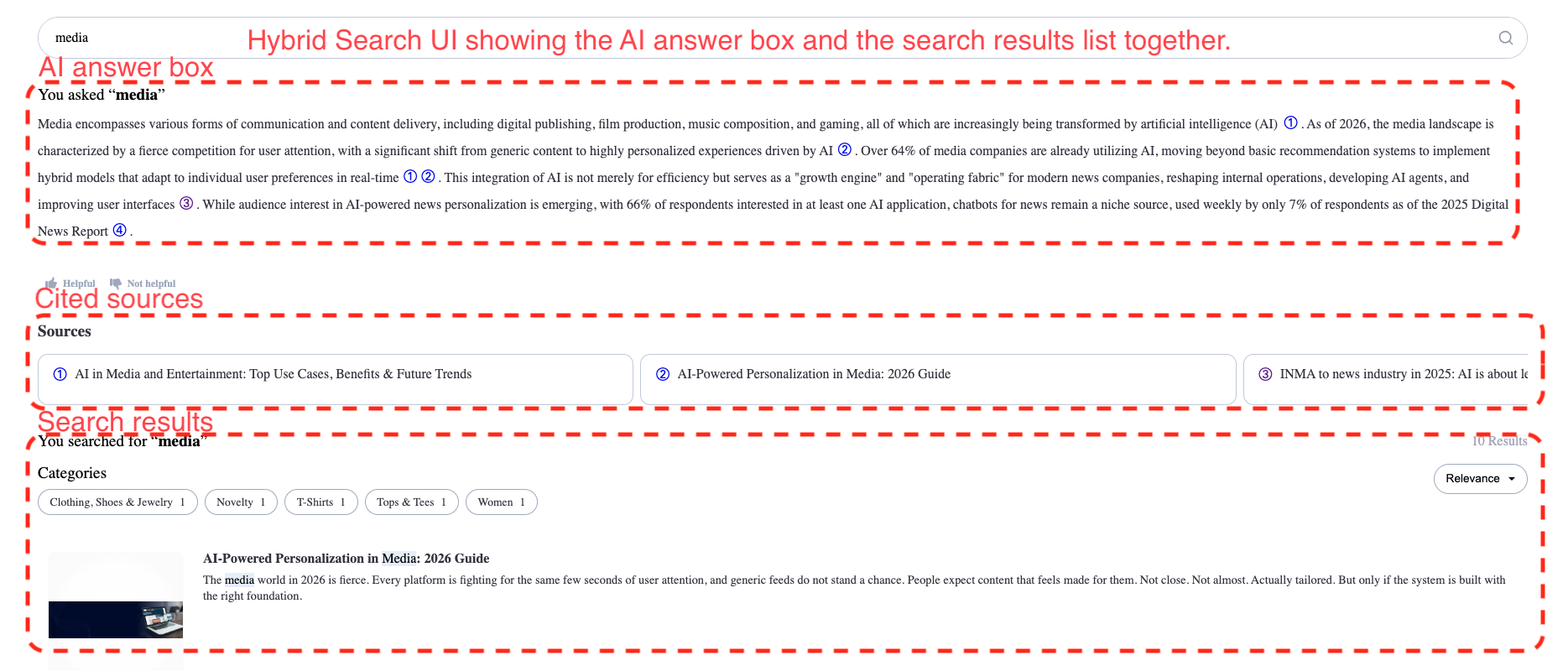
Replace your search results page with one that answers. A reader searches once and gets an AI answer with citations, together with the matching articles.
This takes about ten minutes. At the end you have a working page.
Before you start
Get your publishable API key. Copy it from Overview in the Miso Dashboard. The SDK runs in the browser, so it takes the publishable key, never the secret key. See Authentication.
Put your content in Miso. Hybrid Search works from your catalog. Upload your content first — see Integrating Your Data — and confirm the result in Dashboard ▸ Data Sets ▸ Catalog.
Send categories and cover_image for this workflow. The results list renders
the image, and the category filters come from the hierarchy.
No content of your own yet? Load a real one in a few minutes. Example: Wikinews parses a free public archive of about 20,900 news articles and sends it to Miso, so you have something to ask questions about.
1. Install the SDK
As a node module
In your project directory, run:
npm install --save @miso.ai/client-sdk
Then import MisoClient from the SDK:
import MisoClient from "@miso.ai/client-sdk";
Using a script tag
<script async src="https://cdn.jsdelivr.net/npm/@miso.ai/client-sdk@latest/dist/umd/miso.min.js"></script>
The script tag loads the SDK asynchronously, so your code must wait for it. Use
the misocmd queue, which runs your function as soon as the SDK is ready:
const misocmd = window.misocmd || (window.misocmd = []);
misocmd.push(() => {
  const MisoClient = window.MisoClient;
  // Your code goes here.
});
2. Add the container
Put this where the search page belongs:
<div id="miso-hybrid-search-combo" class="miso-hybrid-search-combo"></div>
3. Start the workflow
const misocmd = window.misocmd || (window.misocmd = []);
misocmd.push(async () => {
  const client = new MisoClient("YOUR_PUBLISHABLE_API_KEY");
  const workflow = client.ui.hybridSearch;

  await client.ui.ready;                    // styles are loaded

  const defaults = MisoClient.ui.defaults.hybridSearch;
  const root =
    document.querySelector("#miso-hybrid-search-combo");
  root.innerHTML = defaults.templates.root();

  workflow.autoQuery();                     // read ?q= from the URL
});
autoQuery() reads the q parameter from the page URL, which is what a normal
search form already submits. Point your existing form at this page, and the
integration is done.
The complete page
<!DOCTYPE html>
<html lang="en">
<head>
  <meta charset="UTF-8" />
  <title>Miso Hybrid Search</title>
  <script async src="https://cdn.jsdelivr.net/npm/@miso.ai/client-sdk@latest/dist/umd/miso.min.js"></script>
</head>
<body>
  <div id="miso-hybrid-search-combo"
       class="miso-hybrid-search-combo"></div>

  <script>
    const misocmd = window.misocmd || (window.misocmd = []);
    misocmd.push(async () => {
      const client = new MisoClient("YOUR_PUBLISHABLE_API_KEY");
      const workflow = client.ui.hybridSearch;

      await client.ui.ready;

      const defaults = MisoClient.ui.defaults.hybridSearch;
      const root =
        document.querySelector("#miso-hybrid-search-combo");
      root.innerHTML = defaults.templates.root();

      workflow.autoQuery();
    });
  </script>
</body>
</html>
Check it works
Save the page, open it in a browser, and add ?q=media to the URL. You get an
answer with its sources, the matching articles, and the category filters.
| Symptom | Cause |
|---|---|
| Results appear, but no answer | The question matched no passage. Check that the article bodies are in html or description. |
| No category filters | Your records carry no categories. |
| Results have no image | Your records carry no cover_image. |
| The page renders empty | The key is the secret key, or your code ran before the SDK loaded. |
Next
- API Configuration — how many results load at a time, and which articles the search can return.
- Events — run your own code at each step of a search and its answer.
- Citation Links — the class, the attributes and the tooltip of each citation.
- Ask — Quick Start — the question box on its own.
- Explore — Quick Start — related questions on an article page.
- Live Showcase — the layouts you can build.
- Hybrid Search API — the API behind the workflow, for your own front end.
