Hybrid Search API
Keyword results and an AI answer, from one call.
One call returns keyword results and starts an AI answer over the same catalog. It is the endpoint behind the Hybrid Search SDK workflow. Below we run one search, then narrow it with facets and filters.
This is the search to use for content. Articles, video and documents bring readers who ask in sentences and want an answer, not only a list. For a product catalog, where traffic is heavy and every query must render at once, use the Search API instead.
Base URL https://api.askmiso.com. Authenticate with the X-API-KEY
header, or ?api_key=. See Authentication.
Search (+ answer)
POST /v1/ask/search
| Field | Type | Default | Notes |
|---|---|---|---|
q |
string | required | The user's query. |
answer |
boolean | "AUTO" |
true |
Run the answer pipeline. "AUTO" decides per query. |
rows |
integer | 10 |
Number of search results. |
start |
integer | 0 |
Result offset. |
fl |
string[] | ["title"] |
Product fields to return (any uploaded field, incl. custom_attributes). |
source_fl |
string[] | ["title"] |
Fields returned for answer sources. |
stemming |
boolean | true |
Reduce query words to their root form. |
facets |
(string | object)[] | [] |
Fields to count, such as tags. Returned in facet_counts. See below. |
order_by |
string | object[] | relevance |
relevance, published_at (newest first), -published_at (oldest first), or your own fields. See below. |
fq |
string | — | Filter, for example tags:Computing. See Filter Syntax (fq). |
user_id / anonymous_id |
string | — | For personalization. |
curl -X POST "https://api.askmiso.com/v1/ask/search" \
  -H "X-Api-Key: YOUR_SECRET_KEY" \
  -H "Content-Type: application/json" \
  -d '{
    "q": "interest rate cuts 2026",
    "answer": "AUTO",
    "rows": 5,
    "fl": ["title", "url", "cover_image"],
    "fq": "section:\"markets\""
  }'
{
  "message": "success",
  "data": {
    "took": 731,
    "total": 3,
    "question_id": "064bda22-1e30-4411-b735-9370a8e48aa4",
    "miso_id": "85d792d9-50a2-43dc-9…",
    "products": [
      {
        "product_id": "wikinews-2911293",
        "title": "Gregory Kurtzer discusses plans for Rocky Linux with Wikinews…",
        "url": "https://en.wikinews.org/wiki/Gregory_Kurtzer_discusses_plans…"
      }
    ],
    "facet_counts": {
      "facet_fields": {
        "tags": [["Computing", 2], ["FLOSS", 2]]
      }
    },
    "parsed_query": null,
    "suggestion": null
  }
}
The answer is not in this response. You get question_id, and you poll the
same endpoint the Ask workflow uses:
POST /v1/ask/search                       -> products now, plus question_id
GET  /v1/ask/questions/{question_id}/answer  -> the answer, when finished
The search returns in about 2 seconds, and the answer follows about 5 seconds later with 7 sources. Render the results first, then fill the answer in when it arrives.
| Field | What it is |
|---|---|
took |
Search time in milliseconds. |
total |
Matching products, before rows is applied. |
products |
The results. fl decides which fields each one carries. |
question_id |
Poll this for the answer. |
facet_counts.facet_fields |
Counts per value, for each field in facets. |
miso_id |
The request id. Send it back on an interaction to attribute the click. |
parsed_query, suggestion |
Query understanding and a spelling suggestion. null when there is nothing to report. |
The search and the answer come back separately. Render the results as soon as they arrive, and let the answer appear when it is ready.
How Miso reads the query
q is a search query, and these operators work on it. The counts below come
from a catalog of 20,901 news articles.
| You write | You get | Matched |
|---|---|---|
linux kernel |
Both words. Miso joins bare words with AND. | 8 |
"linux kernel" |
The exact phrase, in that order. | 5 |
linux AND kernel |
The same as the first row. | 8 |
software OR hardware |
Either word. | 438 |
kernel NOT linux |
The first word, without the second. | 8 |
comput* |
Any word that starts with comput. |
958 |
Three details:
-
A bare space means AND.
linux kernelandlinux AND kernelboth return 8. A reader who types more words gets fewer results, not more. -
NOTsubtracts.kernelalone matches 16 articles, 8 of which also saylinux, sokernel NOT linuxleaves 8. - Quotes narrow.
"open source"returns 100, the loose form 317.
How Miso repairs a query
A broken quote never fails the search. Miso normalizes the query before it runs:
| Input | What Miso does |
|---|---|
“linux kernel” |
Curly quotes become straight ones. It matched the same 5 articles as the straight form. |
"linux kernel |
An odd number of quotes: the unmatched one is removed. It matched 8, the same as no quotes. |
AT&T, m&a, west-bank |
A word joined by &, - or @ is quoted for you, so it survives as one term. |
| CJK text | Miso adds the phrase boundaries, because the words carry no spaces. |
A malformed query therefore returns results rather than an error.
Order the results
order_by takes a shorthand string, or a list of objects for your own fields.
The default is relevance.
| Value | Order |
|---|---|
relevance |
Best match first. The default. |
published_at |
Newest first. |
-published_at |
Oldest first. |
The minus sign does not mean descending here.
published_atis already newest first, and-published_atreverses it to oldest first. It reads backwards, so check it against your own data before you ship a sort control.
Against a catalog of 20,901 news articles:
2023-05-01  Microsoft, Nware sign 10-year cloud gaming deal
2023-03-09  Netherlands set to further restrict semiconductor technology exports
2021-07-05  Ransomware attack hits over 200 US companies
2004-11-15  Big Linux Beta 3 released
2004-11-16  Longhorn for 2006, according to Gates
2004-11-29  Lycos launches screensaver to increase spammers' bills
A record with no published_at sorts by updated_at. It is not pushed to
the end. In the run above, three undated articles appeared in the middle of the
list, each in the position its updated_at earned.
Sort on your own fields
Send a list instead of a string. Each entry names a field, and Miso applies them in order:
{
  "q": "technology",
  "order_by": [
    {
      "field": "custom_attributes.word_count"
    },
    {
      "field": "_search_score"
    }
  ]
}
| Key | What it does |
|---|---|
field |
Any numeric or boolean field in your catalog, or _search_score, or published_at. |
default_value |
The value to use when a record does not have that field. Default 0.0. |
tie_breaker |
What to sort on when two records tie. |
Facet the results
facets returns counts per value, for the products that match the query. Use
them to build filters.
The short form is a list of field names:
{
  "q": "technology",
  "facets": ["tags"]
}
{
  "facet_counts": {
    "facet_fields": {
      "tags": [
        ["Science and technology", 1807],
        ["United States", 1010],
        ["North America", 903],
        ["Europe", 484]
      ]
    }
  }
}
Each entry is [value, count], sorted by count, largest first. The default is
the 10 most common values.
Control the facet
The long form is an object:
| Key | What it does |
|---|---|
field |
The field to count. A custom attribute uses its dotted path. |
size |
How many values to return. Default 10. |
alias |
The key to use in the response. Needed when you facet one field twice. |
include |
A regular expression. Keep only values that match. |
exclude |
A regular expression. Drop values that match. |
ranges |
Buckets for a numeric or date field, each with a key. |
{
  "facets": [
    {
      "field": "tags",
      "alias": "topics",
      "size": 3
    }
  ]
}
{
  "facet_counts": {
    "facet_fields": {
      "topics": [
        ["Science and technology", 1807],
        ["United States", 1010],
        ["North America", 903]
      ]
    }
  }
}
The alias replaces the field name as the key, so two facets on one field do not collide.
include and exclude are case sensitive, and they match anywhere in the
value unless you anchor them:
{
  "facets": [
    {
      "field": "tags",
      "size": 5,
      "include": "Comp.*"
    }
  ]
}
That returns Computing (332), Computron (Wikinewsie) (6), Computer Fraud and Abuse Act (3), and Computron (WWC2013) (2). Neither option changes the
search results, only the facet values.
Filter by a facet
A count next to an option is there so a reader can judge the click before they make it. "Computing 48" is worth a click. "Computing 2" is not.
That sets a rule for what happens after the click. Every shop with a filter rail in the sidebar behaves the same way, and readers arrive expecting it:
- The results narrow to the value they picked.
- Every other group updates. Its counts now describe what is still reachable, so a dead end is visible before they hit it.
- The group they picked from does not count its own filter. The other options in it stay judgeable, and the reader can switch or go back.
Point 3 is the one that is easy to get wrong. A group that counts its own filter collapses its other options to the overlap with the current choice, and a reader loses both the comparison and the way back.
Miso does this for you. Send the selection in facet_filters, keyed by the
field the facet reads:
{
  "q": "linux",
  "facets": [
    { "field": "tags", "size": 4 },
    { "field": "custom_attributes.word_count",
      "ranges": [{ "to": 200, "key": "short" },
                 { "from": 200, "to": 600, "key": "medium" },
                 { "from": 600, "key": "long" }] }
  ],
  "facet_filters": {
    "tags": { "terms": ["Computing"] }
  }
}
The rule is one line. Each group counts with every filter applied except its
own. Two groups over the same catalog of 78 articles, one on tags and one on
custom_attributes.word_count:
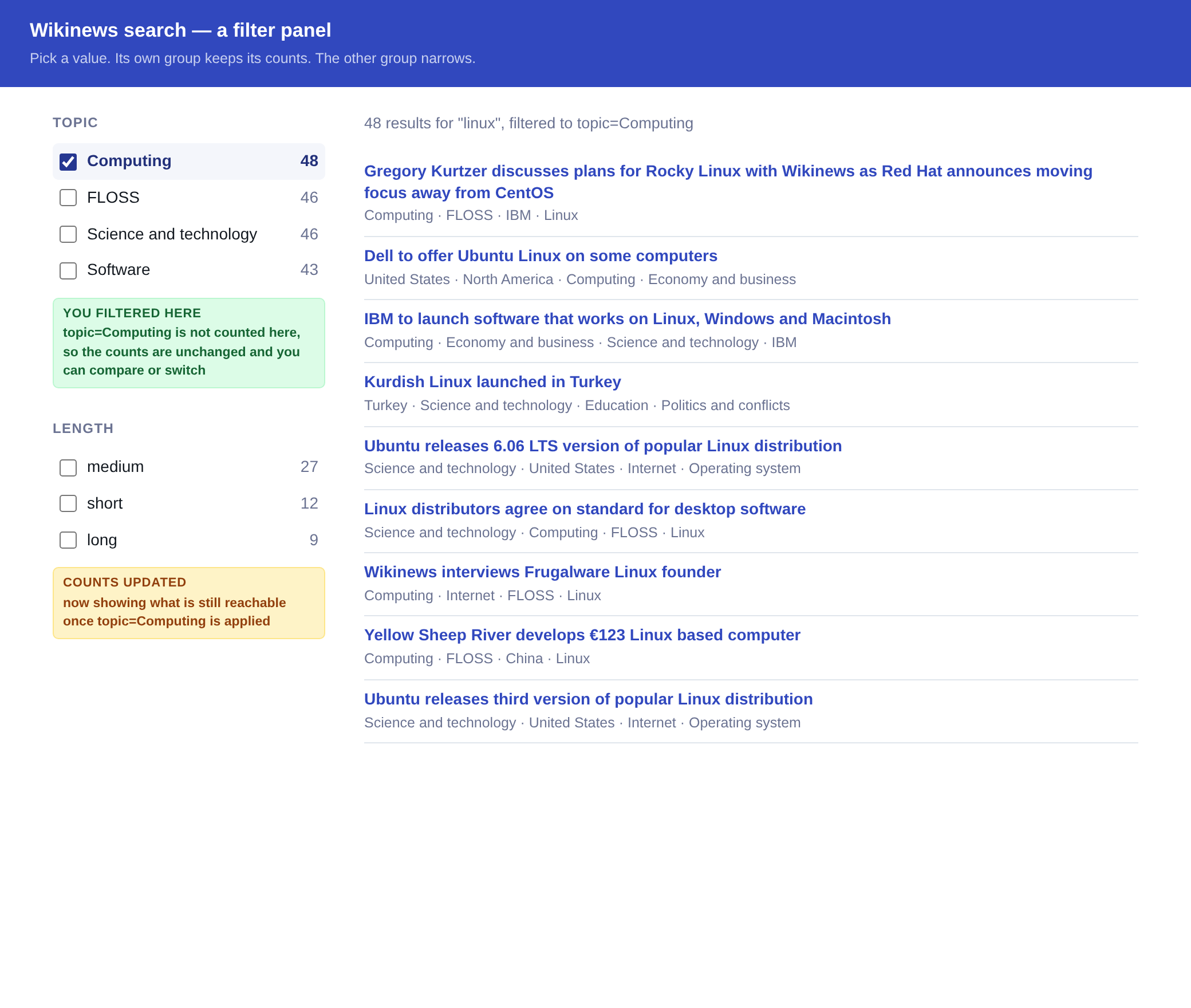
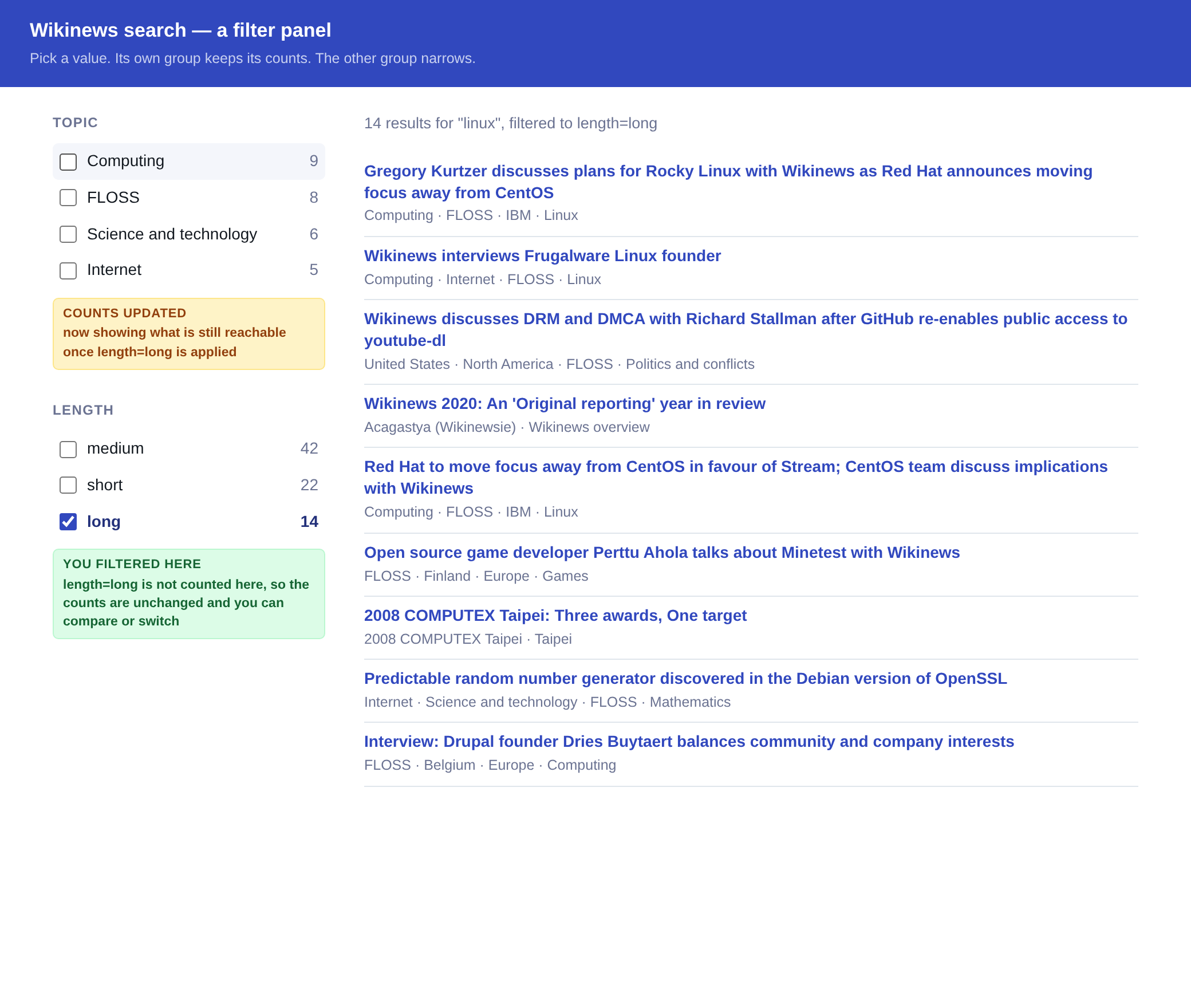
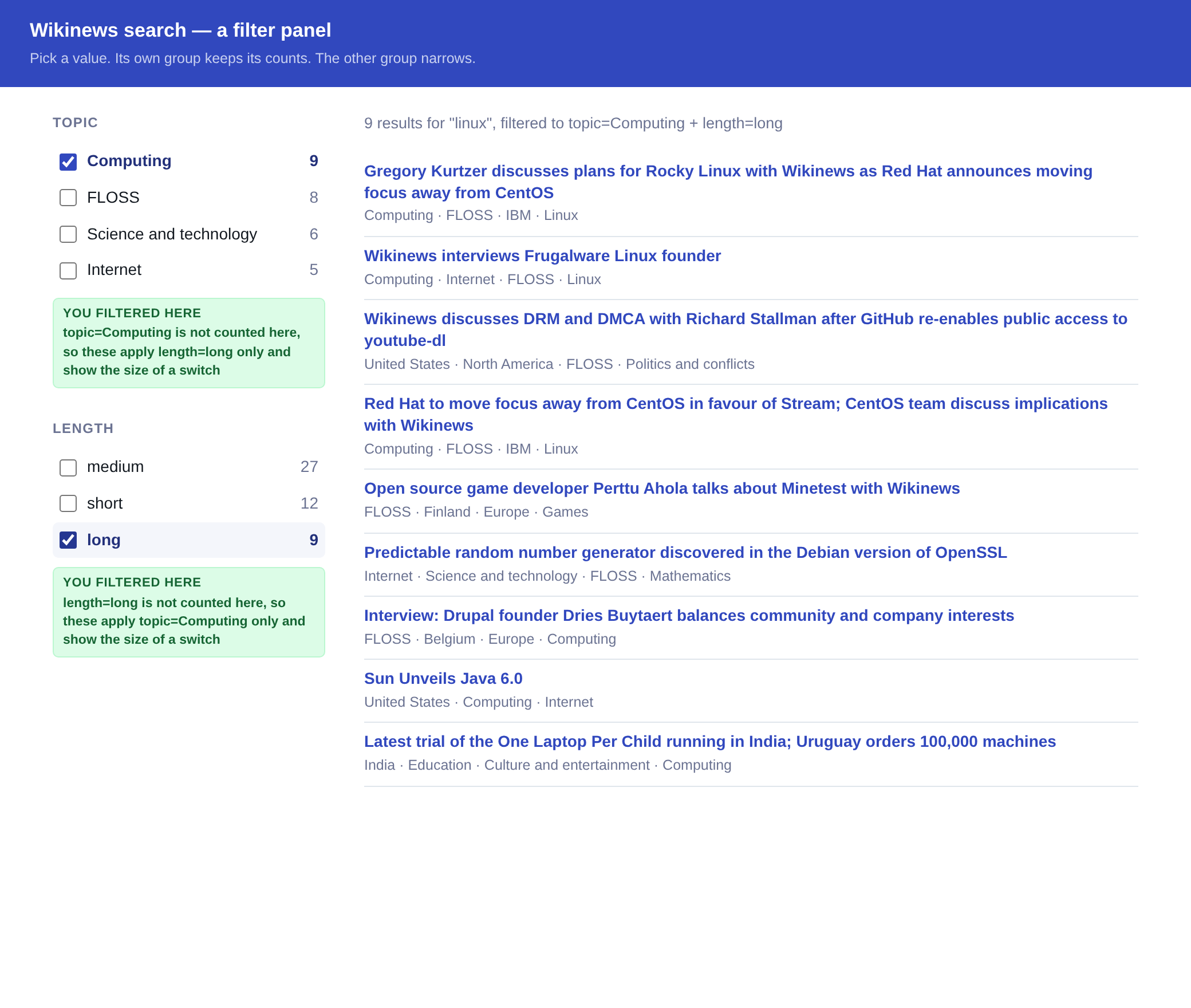
| Ticked | Topic counts | Length counts | Results |
|---|---|---|---|
| Nothing | 48, 46, 46, 43 | 42, 22, 14 | 78 |
Topic Computing |
48, 46, 46, 43 | 27, 12, 9 | 48 |
Length long |
9, 8, 6, 5 | 42, 22, 14 | 14 |
| Both | 9, 8, 6, 5 | 27, 12, 9 | 9 |
The last row is the rule at work. Topic reads 9, 8, 6, 5, which is the long
row, because Topic applies Length and skips itself. Length reads 27, 12, 9,
which is the Computing row, for the same reason in reverse.
That is what makes the panel usable. With both ticked, the results are 9, and
Topic still offers FLOSS at 8. The reader can see the size of the swap before
they make it. Neither request names a facet to leave alone. The key on the
filter does that.
Several values at once
Put more than one value in terms and they widen the group. Add a second group
and the two narrow together:
| Selection | Results |
|---|---|
Computing |
48 |
FLOSS |
46 |
Computing and FLOSS, one group |
59 |
Computing, plus long in Length |
9 |
Values inside one group are an OR, because a reader ticking a second box wants
more results. Separate groups are an AND, because each one is a different
question about the same article.
Keep fq for your own rules
fq narrows everything, including the group the reader is working in. Once
Computing pulls the other topics down to their overlap with it, the panel can
no longer show the size of a switch to FLOSS.
Keep fq for the rules your product enforces, such as hiding paid content from
a signed-out visitor. See Filter Syntax (fq).
Range facets
Group a numeric or date field into buckets you name:
{
  "facets": [
    {
      "field": "custom_attributes.word_count",
      "ranges": [
        {
          "to": 200,
          "key": "short"
        },
        {
          "from": 200,
          "to": 600,
          "key": "medium"
        },
        {
          "from": 600,
          "key": "long"
        }
      ]
    }
  ]
}
{
  "facet_counts": {
    "facet_fields": {
      "custom_attributes.word_count": [["medium", 1495], ["long", 538], ["short", 535]]
    }
  }
}
from is inclusive, to is exclusive, and each bucket needs at least one of
them. The response uses your key, and still sorts by count.
